
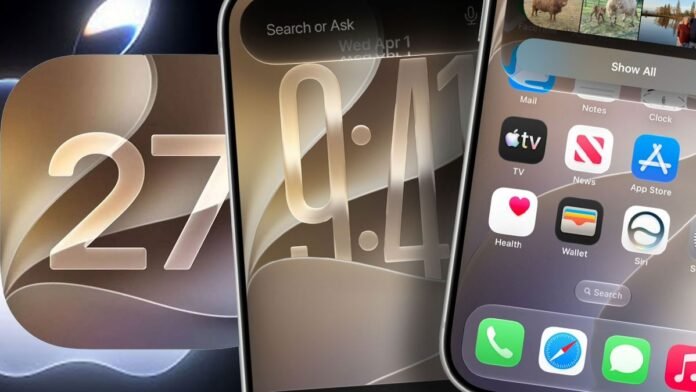

Apple has introduced iOS 27, the upcoming major software update for iPhones set to launch this fall. Offering advanced AI capabilities, enhanced speed, and increased customization options, here are six key features to anticipate.
1. Personalize Your iPhone
Apple is enhancing its visually appealing Liquid Glass design with a new transparency slider in iOS 27. This feature enables users to adjust the glass-like appearance of the interface from crystal clear to deeply tinted, allowing for personalized aesthetics based on individual preferences. Additionally, Apple has revamped various app icons, such as Apple Maps, to provide a more detailed and refined look.
2. Enhanced Siri Functionality
In iOS 27, Siri is receiving significant improvements to its performance. The personal assistant will excel in finding information, responding to messages, and handling complex requests more effectively. Siri will also assist in organizing calendars, creating to-do lists, and aiding in travel planning. A new Visual Intelligence mode integrated into the Camera app will provide instant information when pointing the iPhone at objects, offering functionalities like splitting bills or obtaining nutritional details.
3. Improved Speed Performance
Apple promises noticeable speed enhancements across all iPhone models with iOS 27. App launch times will be up to 30% faster, photo loading in the library will be quicker, and AirDrop transfers are expected to be up to 80% faster. This update is particularly beneficial for users of older iPhone models, like the iPhone 11, extending the longevity of their devices without the need for an upgrade.
4. Seamless Connectivity
iOS 27 is designed to ensure more reliable connectivity for users. iPhones will transition smoothly between Wi-Fi and 4G or 5G networks, reducing interruptions when switching connections. Whether using navigation or taking a FaceTime call, users can expect a seamless transition with minimal disruptions.
5. Simplified Photo Editing Tools
Apple is introducing upgraded photo-editing tools in iOS 27, making complex edits effortless. Users can easily remove unwanted elements from photos, adjust image backgrounds, and make professional-grade edits without the need for specialized software. The new Spatial Reframing feature allows users to reposition subjects in photos long after the initial capture.
6. AirPods Audio Enhancements
AirPods users will have more control over their audio experience with iOS 27. The new AirPods Custom EQ feature enables users to customize bass, mid-range, and treble levels to suit their preferences, resulting in a personalized sound profile for music, podcasts, and movies.
The iOS 27 update will be compatible with a wide range of iPhone models, including the latest releases and some older models like the iPhone SE (2nd generation and later).